
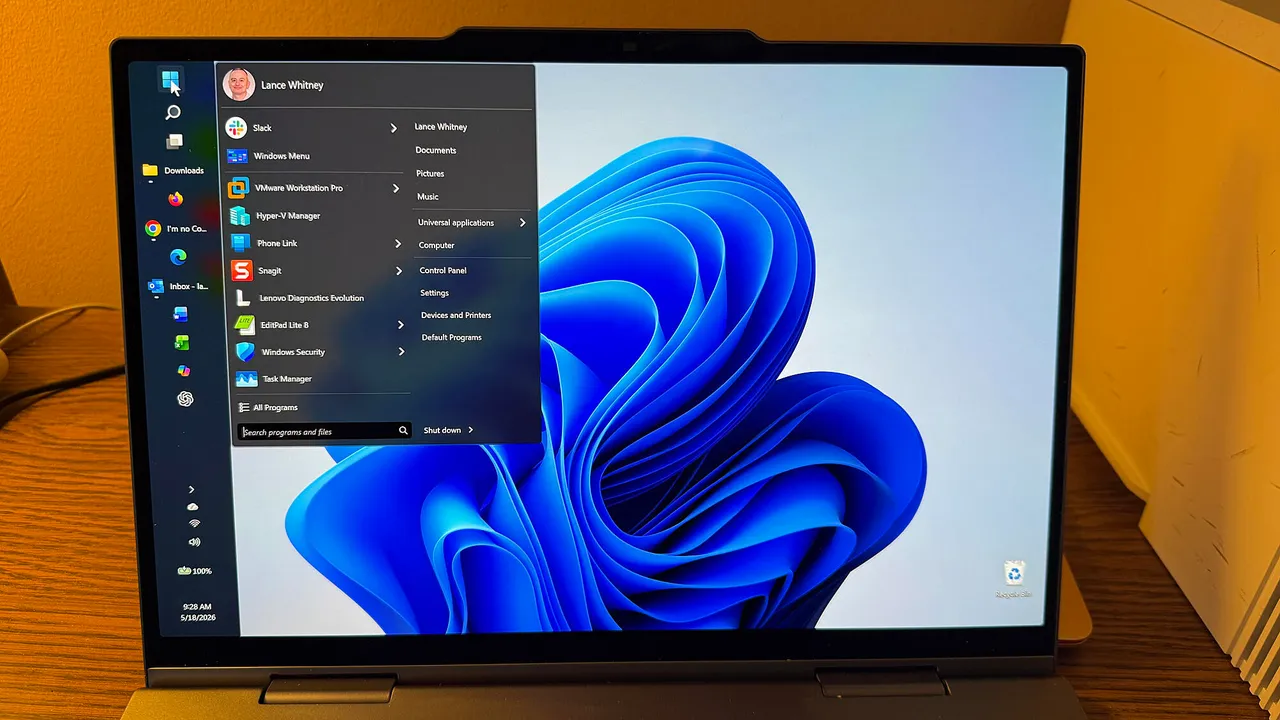
Restoring Control: Microsoft Reintroduces Taskbar Flexibility to Windows 11
For users who migrated to Windows 11, the inability to move the taskbar to the sides or top of the desktop has been a persistent point of friction. After years of rigidity that prioritized a specific aesthetic over user workflows, Microsoft is finally reversing course. By introducing the ability to reposition the taskbar to any edge of the display, the company is tacitly acknowledging a massive disconnect between its design philosophy and actual user productivity needs.
This capability is currently making its way into experimental Windows Insider builds. While it marks a return to the flexibility enjoyed by Windows 10 users, it is more than just a nostalgic toggle. As Microsoft Design Director Diego Baca noted, vertical screen real estate is non-negotiable for developers and creative professionals. Reclaiming that space by shifting the taskbar to a vertical orientation is a functional necessity for modern multitasking.
The Mechanics of the New Taskbar Configuration
The implementation is designed for ease of use. By navigating to the Taskbar behaviors section within the settings menu, users will eventually see a dropdown to pin the orientation to the Top, Bottom, Left, or Right.
Integration goes beyond simple repositioning. Start button alignment will now dynamically shift based on the taskbar’s location—offering top or centered alignment for side-mounted bars, and left or center for horizontal ones. Furthermore, if users opt to disable the Combine taskbar buttons feature, the system will now display text labels alongside icons, allowing for granular window management that had been stripped away in the initial Windows 11 release.
However, the current rollout highlights the experimental nature of these features. Advanced functions like auto-hide, tablet-specific optimizations, and persistent taskbar configurations across multi-monitor setups remain in active development.
Refining the Start Menu Experience
Microsoft’s overhaul extends to the Start menu, which has often been criticized for being overly cluttered with Recommended content that many professionals find irrelevant to their actual output. The upcoming revisions offer a more modular approach to the interface:
Granular Control: Users will gain the power to independently toggle the Pinned and Recommended sections.
Smarter Recommendations: The Recommended label is shifting to Recent, with clearer logic applied to file suggestions, allowing users to disable Start menu file recommendations without impacting jump list history in File Explorer.
Size Management: Moving away from adaptive sizing, Microsoft is introducing manual Small and Large presets to ensure a consistent visual experience.
Privacy Gains: For those presenting or screen-sharing in professional environments, a new option to hide user names and avatars provides a layer of professional discretion.
Market Implications: A Pivot Toward Usability
This move signals a strategic shift in Microsoft’s Windows development roadmap. Over the past two years, the industry perception has been that Microsoft was overly fixated on AI integration and aesthetic mandates, often at the expense of user agency. By addressing these foundational flaws, the company is attempting to repair the brand sentiment surrounding Windows 11 as it moves toward becoming the standard enterprise OS following the official end of support for Windows 10.
While these features currently exist within the fickle environment of the Experimental Insider channel, their eventual migration to the general build will likely influence how enterprises approach OS migrations. User hostility toward forced UI changes often results in costly post-deployment support tickets. By re-adopting the customization-first approach that defined their most successful operating systems, Microsoft is moving away from a walled garden approach and back toward the versatile, power-user-friendly toolkit that once made Windows an industry staple.